
Running UNSW CSE autotests from my own machine with Rust
Most UNSW CSE assignments involve two commands: autotest to run the tests, and give to submit the work. Both are only available on the university's servers, so wherever I write the code, I still have to log in to a CSE server to run them.
I'm learning Rust this term in COMP6991, and I'd been looking for a small project to practise with. This seemed like a good fit, so I made CSERun.
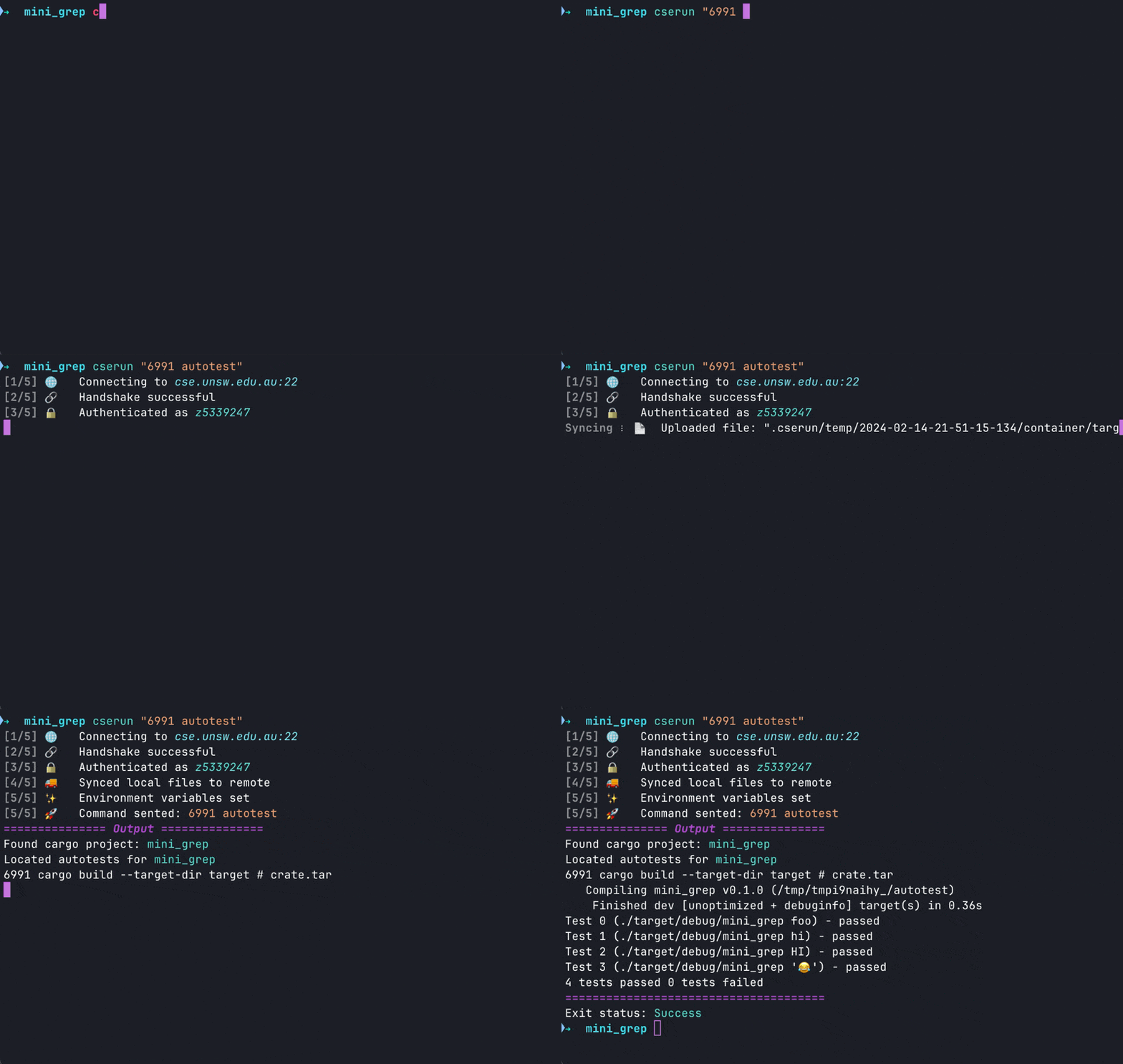
The hassle of developing locally
Writing code directly on the server works fine, whether with vim or VS Code's remote features. But I prefer working on my own machine, where my editor and configuration are already set up. I only need the server when it's time to run the tests.
That means every change comes with the same tedious routine:
- Edit the code locally.
- Transfer the files to the server with scp or rsync, or push with git and pull on the server.
- Log in over ssh and cd into the right directory.
- Run autotest and check the results.
- Go back to the local code and keep editing.
What I wanted
I wanted something simple: one command, run from the assignment directory on my own machine.
cd ~/COMP6991/lab01/exercise01
cserun "6991 autotest"
It should connect to the server, authenticate, upload the current directory, run the command there, and display the output as-is in my local terminal.

A fresh directory for every run
To keep old files from interfering, each run gets a new directory on the server. Its name is the current timestamp, and it lives under ~/.cserun/temp/. Uploaded files go into a container subdirectory. I also save the command in command.txt, in case I want to check what I ran later.
// Name the directory after the current time, e.g. .cserun/temp/2024-02-14-01-10-40-224/
let temp_dir_name = chrono::Local::now()
    .format("%Y-%m-%d-%H-%M-%S-%3f")
    .to_string();
let remote_dir = format!(".cserun/temp/{}", temp_dir_name);
The command runs inside container, so from its point of view, it's running in a clean assignment directory.
pre_exec_command.push_str(&format!("cd {}/container && ", remote_dir));
let command = format!("{}{}", pre_exec_command, conf.command);
channel.exec(&command)?;
Syncing files
For the connection and uploads, I use ssh2, a wrapper around libssh2. It handles authentication, SFTP, and command execution.
To decide which files to upload, I use the ignore crate to walk the local directory. It's the same crate used by ripgrep. It reads .gitignore and .ignore automatically, so directories such as target and node_modules won't be uploaded if they're already listed in .gitignore. I don't have to maintain another set of exclusion rules.
let walker = WalkBuilder::new(local_path)
    .ignore(true)
    .git_ignore(true)
    .build();

for entry in walker.flatten() {
    let path = entry.path();
    if let Ok(strip_path) = path.strip_prefix(local_path) {
        let remote_path = remote_base_path.join(strip_path);
        if path.is_dir() {
            sftp.mkdir(&remote_path, 0o755)?;
        } else {
            upload_file(sftp, path, &remote_path)?;
        }
    }
}
Some commands don't need any local files, such as 6991 classrun -sturec. For those, I added --no-sync, which skips the upload and just creates an empty directory.
Authentication
Connection settings live in ~/.config/cserun/config.toml. On the first run, if the file doesn't exist, the program creates a template and asks me to fill it in.
There are three authentication methods: a password, a key file, or ssh-agent. A Rust enum fits this nicely, with the data each method needs stored in its corresponding variant.
pub enum Auth {
    Password(String),
    AuthKey(AuthKey),
    Agent,
}
A match handles each method. If I add a variant or miss a case, the compiler reminds me.
match conf.auth {
    Auth::Password(p) => {
        sess.userauth_password(conf.username.as_str(), p.as_str())?;
    }
    Auth::AuthKey(auth_key) => {
        sess.userauth_pubkey_file(/* ... */)?;
    }
    Auth::Agent => {
        sess.userauth_agent(conf.username.as_str())?;
    }
}
If password authentication is selected but no password is saved in the configuration file, rpassword prompts for it at runtime without echoing it on the screen.
Output
I wanted output to appear as the command runs, just as it would locally, rather than arrive all at once after the command finishes. So I put the connection in non-blocking mode, repeatedly read standard output and standard error, and print whatever arrives straight away.
sess.set_blocking(false);

loop {
    if channel.eof() {
        break;
    }

    let mut is_data_available = false;

    match channel.read(&mut buffer) {
        Ok(size) if size > 0 => {
            print!("{}", String::from_utf8_lossy(&buffer[..size]));
            is_data_available = true;
        }
        Ok(_) => {}
        Err(e) if e.kind() == io::ErrorKind::WouldBlock => {}
        Err(e) => return Err(e.into()),
    }

    // Handle standard error the same way
    // ...

    if !is_data_available {
        // Sleep briefly when there is no data to avoid maxing out the CPU
        std::thread::sleep(Duration::from_millis(100));
    }
}In non-blocking mode, a read can return WouldBlock when no data is available yet. That isn't a failure; it just needs its own match arm so the loop can continue.
I also added --env to set environment variables for the command. This came with a small snag: libssh2's setenv doesn't always work on the CSE server. If it fails, I fall back to prepending an export to the command.
channel.setenv(env[0], env[1]).unwrap_or_else(|_| {
    pre_exec_command.push_str(&format!("export {}={} && ", env[0], env[1]));
});
Command-line arguments
I used clap's derive API for the command-line arguments. A few attributes on a struct provide both argument parsing and the help text.
#[derive(Parser, Debug)]
#[clap(version, about, long_about = None)]
struct Args {
    /// Do not sync files before running the command
    #[clap(long, requires = "command")]
    no_sync: bool,

    /// Set environment variables, in the format of KEY:VALUE
    #[clap(long, value_name = "KEY:VALUE", value_parser = parse_env, requires = "command")]
    env: Vec<String>,

    /// The command to run on the cse server
    command: Option<String>,

    /// Show the path of config file
    #[clap(long, conflicts_with_all = &["no_sync", "env", "command"])]
    config: bool,
}
The relationships between arguments can be declared in those attributes too. For example, --no-sync and --env require a command, while --config must be used on its own. That saves me from writing those checks myself.
Using it
With Rust installed, installation takes one command:
cargo install cserun --git https://github.com/xxxbrian/cserunThen I can run it from an assignment directory. Here's an example that skips file syncing and sets a couple of environment variables:
cserun --no-sync --env uni:unsw --env faculty:cse "echo \$uni; echo \$faculty"
[1/5] 🌐   Connecting to cse.unsw.edu.au:22
[2/5] 🔗   Handshake successful
[3/5] 🔒   Authenticated as z5339247
[4/5] 🚫   Skipped syncing local files
[5/5] ✨   Environment variables set
[5/5] 🚀   Command sented: echo $uni; echo $faculty
=============== Output ===============
unsw
cse
======================================
Exit status: Success
For everyday use, it's just cserun "6991 autotest". I edit the code locally, run the command, and the test results appear in my own terminal.